How to Leverage Google My Business’ More Hours to Promote Your Services
Multi-location businesses now have another way to stand-out in search by optimizing their Google Business Profiles with the More hours function.



Your Google Business Profiles are some of the first touchpoints people have when looking for products or services like yours online. So when it comes to core information, such as your NAP data (name, address, phone number), it's critical to keep it up-to-date at all times. For most businesses, this core information will not change unless you’ve made a significant brand change or move. However, opening hours fluctuate regularly—not only between weekdays and weekends but also during holiday seasons.
The GBP More Hours Features
After plenty of user feedback, in 2020, Google added the ‘More hours’ feature so that businesses can expand their primary operating hours.
Primary Hours
Primary hours on Google Business Profiles refer to the regular operating hours of a business throughout the week, typically from Monday to Sunday. These hours are considered the standard schedule during non-holiday periods that businesses have been able to publish and manage on Google for years.

Special Hours
Special hours, on the other hand, are temporary or exceptional operating hours that businesses set for specific days or occasions. These override the primary hours and are typically used for holidays, special events, or other instances when the business operates differently from its regular schedule.
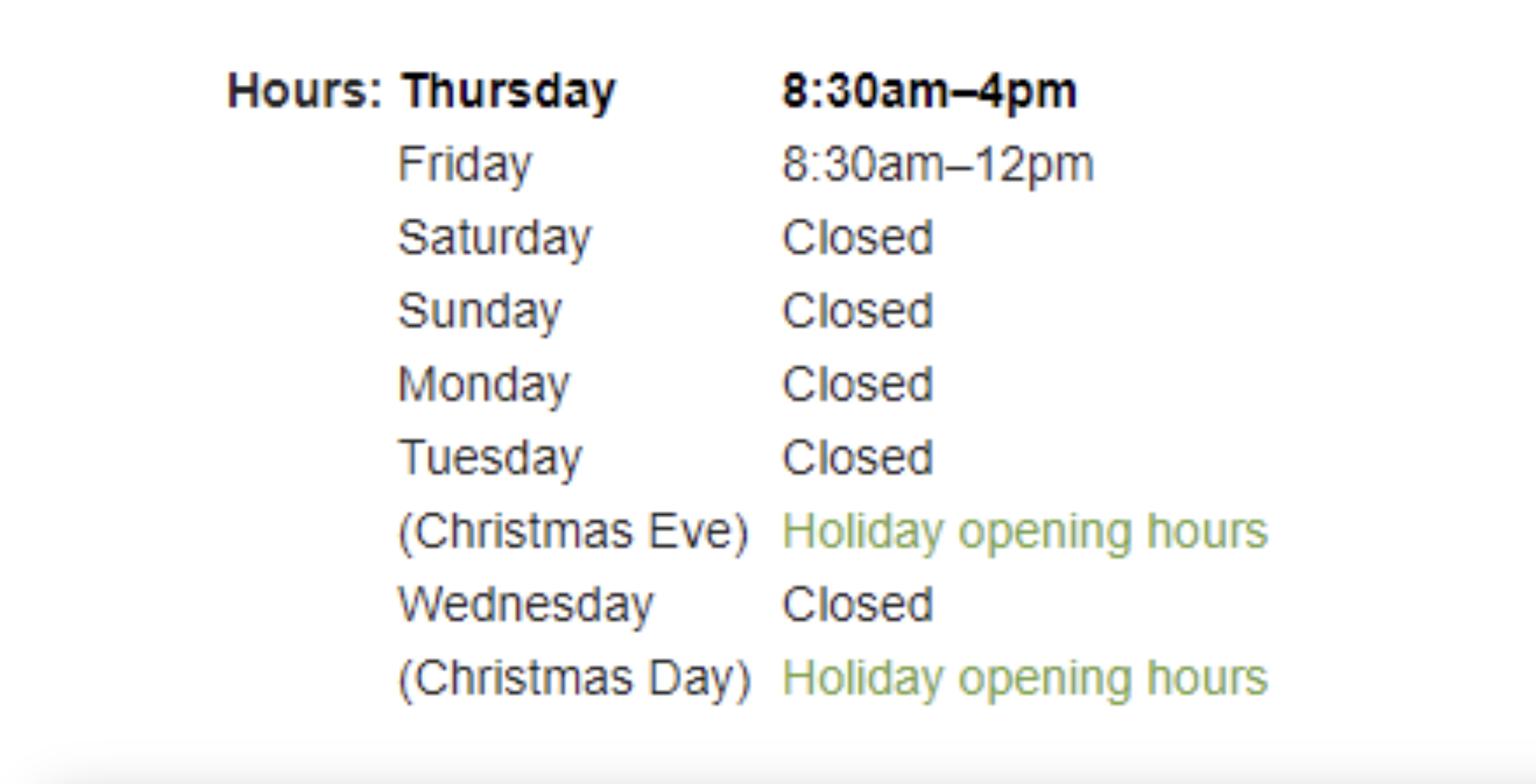
By setting special hours, businesses can ensure that customers receive accurate information about their operating hours during these exceptional periods. For example, if your hours are changing because of a national or regional holiday, Google will let your customers know these are the confirmed holiday operating hours. This helps reinforce to searchers that they can trust the information displayed on the business profile.
More Hours
More hours are additional sets of hours that are displayed on your Business Profile alongside your primary set of hours. These hours are used to display extended or supplementary hours that may vary throughout the week or on specific days, including early morning or late evening hours as well as hours for specific services or departments within the business.
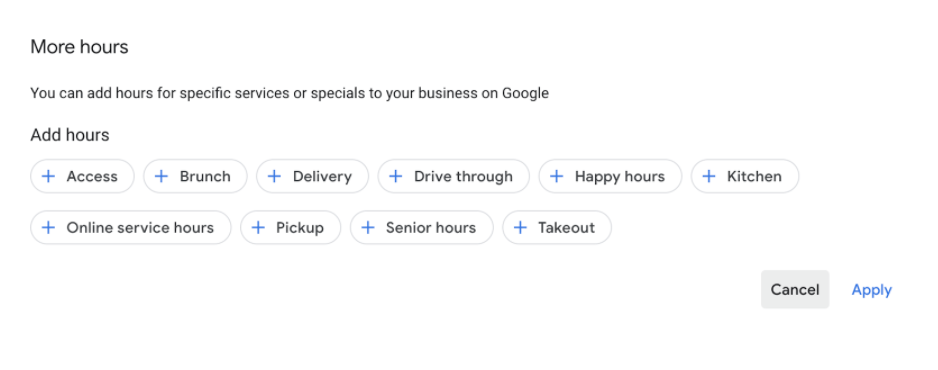
By providing "more hours," businesses can offer flexibility to customers and ensure that they have access to services outside of the regular operating hours. There's even a set of defined categories that will be displayed alongside the additional hours.
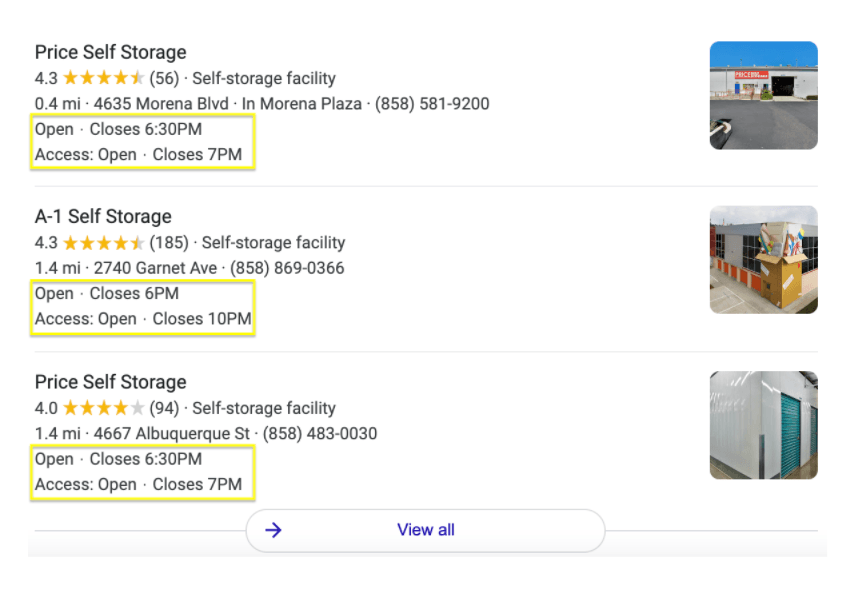
5 Top Takeaways From Google’s More Hours Feature
- More hours are a subset of your Primary hours.
- Primary hours must be in place before publishing More hours.
- Multiple types of More Hours can be used if they apply to your business. For example, if you’re a restaurant and offer both brunch and happy hours, you could add both categories.
- The types and availability of hours types depend on your primary category and the country in which your business operates.
- Special hours will not override More hours, only Primary hours. This means if you have your Special hours set to close on Saturday, December 25, but you have Saturday delivery hours published, these will still display while your Business Profile shows closed.
How Do Operating Hours Impact Customer Acquisition?
Updated opening hours are crucial for businesses as they directly impact customer satisfaction and retention. Providing accurate and current opening hours ensures that customers can plan their visits accordingly, avoiding frustration or inconvenience due to outdated information. Moreover, they build trust and reliability, showing that the business is attentive to its customers' needs and committed to delivering a seamless experience.
Additionally, updated opening hours contribute to a positive online reputation, as customers are more likely to leave favorable reviews when their expectations are met. Ultimately, keeping opening hours up-to-date demonstrates professionalism and enhances the overall brand image, fostering loyalty and repeat business.
By the way: Google is getting better at understanding the nuances of businesses and how to represent these best to local consumers. So your Google Business Profile has the potential to capture new leads and convert them into lifetime customers. But in order to stand out from the competition, you need to show the most critical and helpful information as soon as a user lands on your GBP. This not only helps to set expectations, but also serves as an opportunity to highlight unique offerings which could vary by location. Just think of 'More hours' as another touchpoint to add value to your customer experience.
10 Different Types of Hours You Can Activate on Your Google Business Profile
Managing the various types of hours on your Google Business Profile can significantly enhance customer experience and streamline operations. From access hours to brunch and delivery, each type of hour serves a unique purpose in meeting customer needs and preferences. By activating these hours effectively, businesses can ensure that customers have accurate information about when they can access products or services, leading to increased satisfaction and loyalty.
- Access: hours to represent times when a customer or client can visit your business, accessing their product or service (even if the primary office is not open).
- Brunch: hours when a customer can order from the brunch menu at your restaurant.
- Delivery: hours when you are offering delivery of your products.
- Drive-through: hours when your drive-through is open to customers.
- Happy hours: hours when happy hour menus are available at your restaurant.
- Kitchen: hours that the kitchen accepts food orders.
- Online service hours (or online operating hours): hours when employees are available to help virtually.
- Pickup: hours when a business offers pickup for orders placed online or via phone.
- Senior hours (or hours for the elderly): hours for businesses specifically reserving days and times for seniors and immunocompromised shoppers.
- Takeout (or takeaway): hours when customers can into the location to order and take meals home.
Whether it's offering senior hours for vulnerable populations or drive-through hours for added convenience, activating these hours demonstrates your commitment to providing exceptional service. By staying attuned to customer demands and adapting your hours accordingly, you can strengthen your brand reputation and foster long-term customer relationships.
How to Create More Hours for Multiple Locations
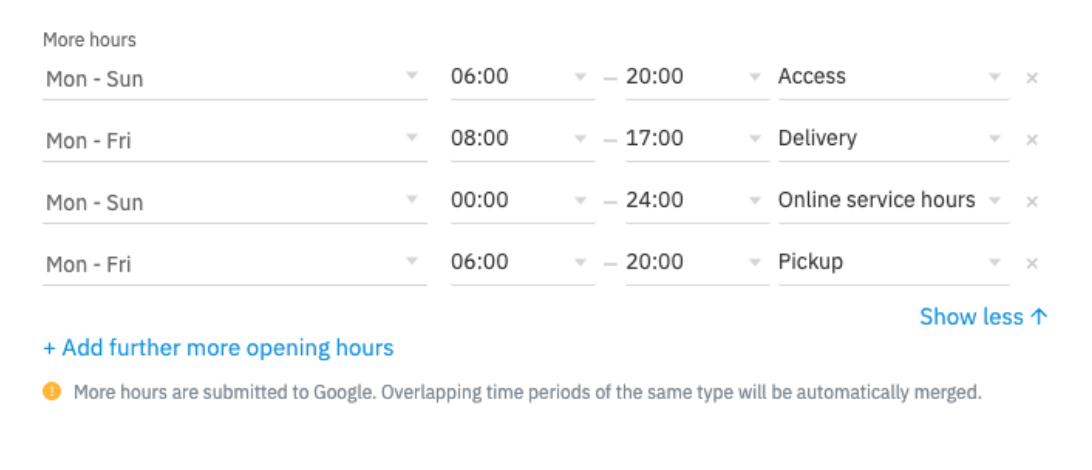
To create more hours for multiple locations on your Google Business Profile, start by accessing your GBP dashboard and selecting the location for which you want to add more hours. Then, navigate to the "Info" tab and scroll down to the "More hours" section. Here, you can click on "Add hours" and choose the specific type of additional hours you want to create, such as brunch, delivery, or pickup. Enter the relevant time range and days for these hours, ensuring accuracy and consistency across all locations. Once saved, these additional hours will appear on your GBP, providing customers with valuable information about your extended service offerings and enhancing their overall experience.
It's easier though with a location marketing platform like Uberall that allows you to enter your opening hours centrally to then update these across multiple locations. Reach out!
How Google Verifies Business Information
Google takes a proactive approach to ensure the accuracy of business information, using a combination of automated systems and manual reviews.
One significant tool is Google Duplex, an AI technology that can makeautomated calls to businesses to verify details such as operating hours. Specifically, Duplex uses natural language processing to interact with business representatives, ensuring real-time updates and reducing the burden on business owners to manually update their information.
Additionally, Google cross-references information from other reliable directories and sources to confirm the data listed on Google Business Profiles. Also, users can suggest changes or updates to business information, which is pivotal in keeping the information up-to-date and relevant.
By leveraging these methods, Google ensures that the information presented to users is both current and reliable, thereby improving the overall user experience and helping businesses in promoting their services effectively.



1,800 brands trust us to stay visible
— not just show up once or twice in local search.